
Technical innovations of VIMP 6.5
VIMP 6.5 includes numerous improvements that increase performance and security on the one hand and provide new functionality in VIMP on the other. As always, you can find the complete list of all changes in our changelog.
System requirements
Please note the system requirements. Compared to VIMP 6.2, the supported PHP versions have changed. Since PHP 8.1 has reached its end of life, VIMP now requires at least PHP 8.2. The highest currently supported PHP version is PHP 8.3. In addition, a Redis database is now required if you want to use the rate limit for forms.
SourceGuardian Loader
The SourceGuardian Loader must be installed in at least version 15.0 for all VIMP editions in order to install VIMP 6.5 (no change to the previous version).
Before the Update
As always, make a backup of your VIMP installation before the update.
Warning
If you are running VIMP in a Docker container, please be sure to follow our updated installation and update instructions for Docker installations.
Advance notice
Note
VIMP 6.5 will be the last version to include the Pacific template. Starting with the next version, we will no longer include the Pacific template. If you are still using the Pacific template, please take this time to switch to the Ocean template. It offers all the features you previously had with the Pacific template - including the dark skin, which is now available starting with this version.
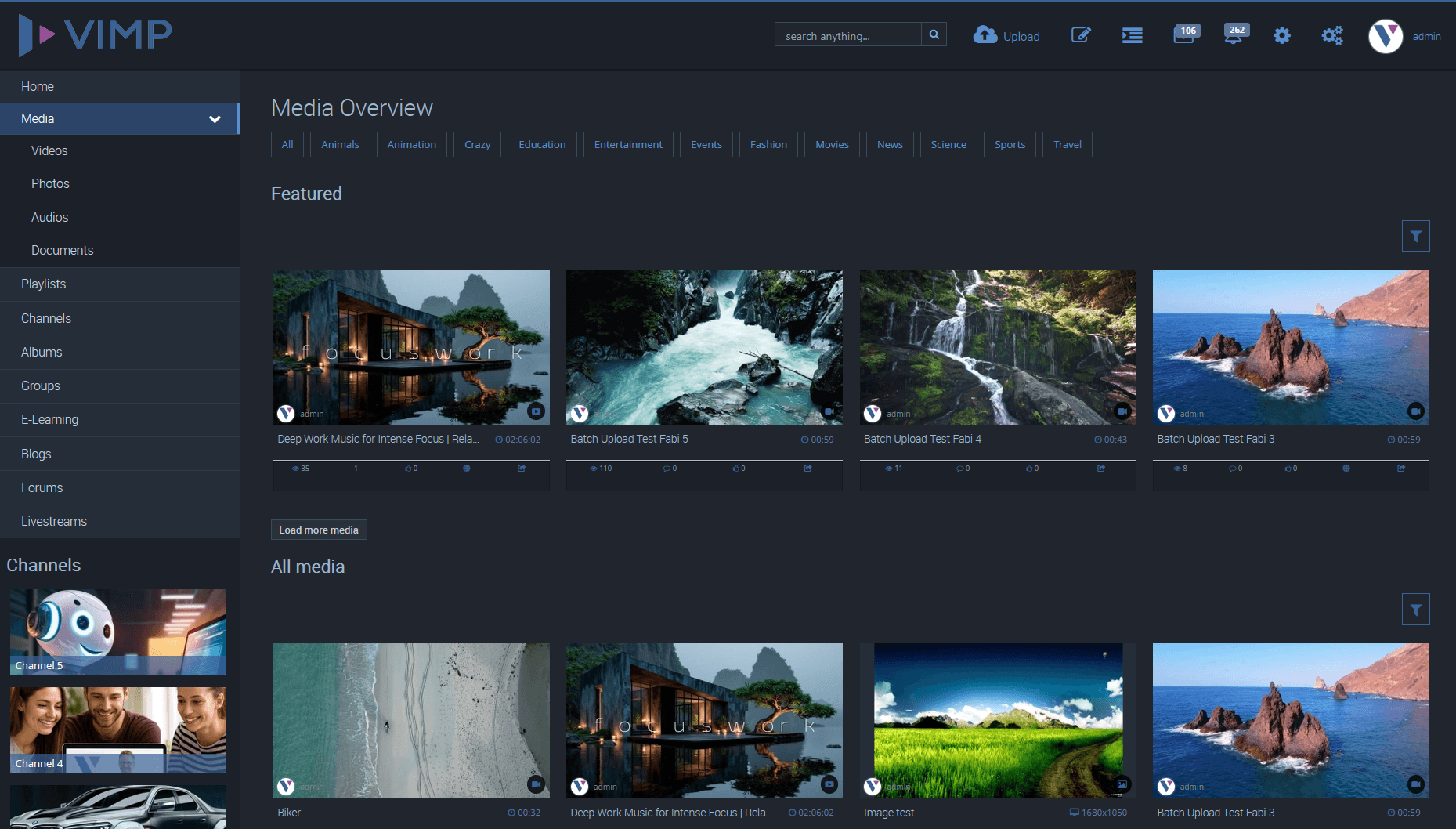
Ocean Dark Skin
As of this version, we provide an additional dark skin for the Ocean template. You can select and activate it in the Template Manager or under Configuration -> Basic -> Templates.
Two-factor authentication (2FA)
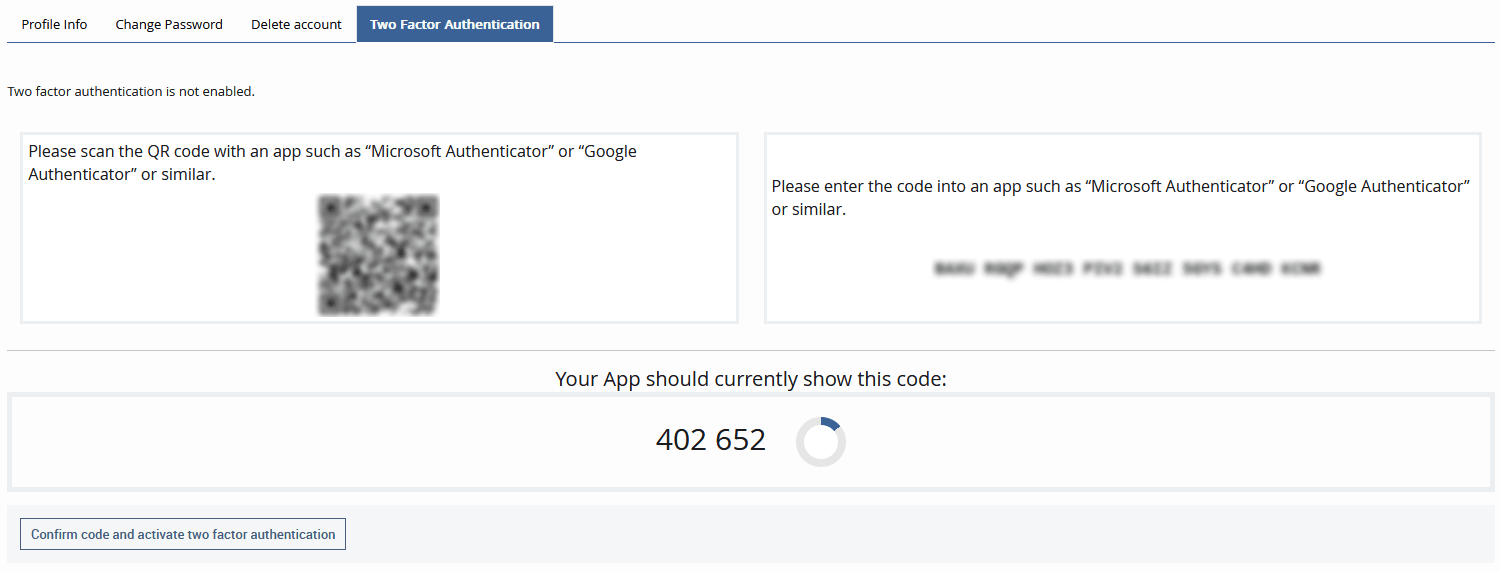
VIMP now supports two-factor authentication (2FA).
You can define whether 2FA is mandatory or only optional for specific user roles.
Two-factor authentication supports common authenticator apps such as Google Authenticator or Microsoft Authenticator and provides a QR code or a secret for setup.
Note
The use of 2FA is tied to the following role permission:
allow two factor authentication
Tip
You can find detailed, step-by-step instructions for setting up 2FA in VIMP in our FAQ article.
Livestreaming improvements
The livestream server module has been completely revised in this version.
Setting up livestream servers is now even easier and more powerful. Playback is handled by MediaMTX and supports more input formats than before.
The HA capability (high availability, i.e. clustering and failover) for livestream servers has also been improved.
Running livestreams can be recorded and made available as on-demand videos in the portal.
Livestream housekeeping ensures that livestream entries that are no longer available are deleted automatically. Of course, individual livestreams can also be excluded from housekeeping.
Note
The following new permissions have been added for the livestream module:
allow livestream housekeeping excludestart livestream recordings
Note
The following new task has been added for the livestream module:
vimp livestreamserver:create [--create-service] [--service-name="..."] title ip ssl-cert ssl-key
Warning
Live stream servers created using VIMP's previous live stream server component will not be carried over with the update; they must be recreated!
Tip
You can find detailed, step-by-step instructions for configuring the livestream server in our administration guide.
Media encryption
Media can now optionally be encrypted on the server. You can enable this option under Configuration -> Transcoding -> Transcoding OpenSource -> Encrypt media files.
Please note:
- Once enabled, encryption only applies to newly uploaded media.
- If you also want to encrypt existing media, they must be transcoded again.
- Media must first be decrypted during playback, which slightly increases the server load.
- For downloads, files are still provided unencrypted, as they could otherwise not be played outside of VIMP.
Revised URL signing
URL signing has been completely revised. It now works without tokens and blocks embeds via the referer.
The revision also introduced a new configuration option that lets you define globally for VIMP which media sources should be made available for playback at all. The possible options are:
- File (MP4) and streaming (HLS)
- File (MP4) only
- Streaming (HLS) only
- Neither
You can find this setting under Configuration -> Streaming -> Streaming settings.
Note
The “Media Embed Restrict” plugin was removed as part of the redesign, since its functionality is now fully included in the URL Signing plugin.
Nextcloud integration
Optionally, media files can be copied automatically to a Nextcloud instance after transcoding. You can choose whether the files should be transferred to a user directory or to a defined global directory in Nextcloud.
Revised log system
The VIMP syslog has been fundamentally revised and merged with the activity log.
The "Log" top link in the admin panel takes you to the new combined log. It now contains all entries and can be filtered by event.
At the same time, a SIEM-compatible log is written to the log/ directory on the server, where it can be collected by an external agent for a monitoring server.
Directory service mapping for user fields
Custom user fields can now also be mapped to LDAP and/or SAML attributes. This gives you full flexibility to transfer additional information from the directory service into your user fields.
Additional permissions for sharing own media
Until now, permission to share one's own media depended on the general sharing permissions that can be granted to a role.
From now on, there are additional permissions that explicitly allow sharing one's own media, even if the general sharing permission is missing. This means you can now define that a role may only share its own media, but not the media of other users.
Note
The following new permissions have been added:
allow own media share emailallow own media share embed iframeallow own media share embed jsallow own media share qr codeallow own media share socialallow own livestream share emailallow own livestream share embed iframeallow own livestream share social
The permission allow media share has been removed. Instead, the share button now appears on the media page as soon as at least one of the sharing permissions has been assigned to the user role.
New auditor role
As of this version, the role overview contains a new role named "Auditor".
Users with the auditor role get read access to all areas by default - like an administrator, but without the permissions to change content.
For this purpose, numerous new permissions have been added to VIMP. Most of them are write permissions for existing permissions and end in "write", e.g. access backend livestreams write.
Note
With the update to VIMP 6.5, all new permissions are automatically enabled for the administrator role.
Nevertheless, after the update, please make sure to check all existing roles and their permissions for correctness.
Tip
For more information about the auditor role, please see our FAQ article.
New rich text editor (RTE)
With this version, the two RTEs previously available for selection are replaced by a new, modern RTE. No action is required on the administration side - the new RTE is integrated automatically if you had enabled one of the two old RTEs.

Removal of media delivery without framework call
Media delivery without framework call was originally introduced to speed up the delivery of media in the player. This function has since become obsolete, as there is no longer any measurable difference to regular delivery. We are therefore removing media delivery without framework call with this version.
Note
No manual changes are necessary. Even if you had previously enabled media delivery without framework call, VIMP now redirects such requests automatically.
Additional tokens for mail templates
You can now use the following two tokens/placeholders in the mail templates - especially in the mail template for additional media owners:
- Initiator of the additional media ownership assignment:
[initiator:displaynameraw] - Owner of the medium:
[mediaowner:displaynameraw]
Task: Reset transcoding
If a server is shut down during a transcoding process, the transcoding cannot report an error. As a result, the medium remains permanently in the "converting" status. This also blocks the available slots for parallel transcoding.
For this case, there is now a new task that resets the transcodings currently in progress.
- The task checks whether it is being run as root.
- The task checks whether an ffmpeg, ffprobe or exiftool process is currently working on the medium.
- The task checks whether the medium has not been updated within the last 2 minutes.
./vimp framework:reset-transcoding
Parameters:
--verbose outputs extended information
--ignore-user skips the "root user" check
--ignore-processes skips the check for "ffmpeg / ffprobe / exiftool" processes
--ignore-updatedate skips the "changed within the last 2 minutes" check
Multiple users with the same email address
It is now possible to create multiple users with the same email address in VIMP.
Warning
Please note that certain functions, such as VIMP's forgotten password function, also use the same email address for multiple accounts. This option is therefore mainly recommended for accounts registered via LDAP or SAML.
Rate limit for forms
You now have the option of setting up a rate limit for forms. This requires a connection to a Redis database. You can find out how to install it on your server in this FAQ article.
The rate limit protects your VIMP platform, and thus also your server, against extensive automated attacks on your forms, e.g. the login form.
In the configuration, you can set specific limits that apply per form.
Tip
Our FAQ article provides step-by-step instructions on how to install the Redis database.
Additional SAML Configuration Fields
The SAML configuration has been expanded to include additional fields that offer you advanced configuration options for encryption and signing, as well as support for the display name.
Tip
The new fields are marked accordingly in our FAQ article.
Change regarding unattended installation
As of VIMP 6.5, for technical reasons it is no longer possible to prefill encrypted fields in the YAML file for the unattended installation (e.g. unattended.yml). Encrypted fields are all those that are not displayed directly in the configuration and require the password to be entered again for access.
Replacement of Several Third-Party Libraries
In VIMP 6.5, several third-party components were removed and replaced with native browser functionality or updated.
API changes
- The API methods
editMediumanduploadMediumnow contain two new parameters that can be used to control download permissions per medium (enable_download,enable_download_for_users). - The API method
getMediumadditionally contains the settings for the media download (see above).
You can also find all the changes in our API documentation.